
During your initial Knownwell setup, you will have the opportunity to invite your email administrator to configure the email settings. There are two access options when ingesting email from Microsoft 365 or Google Workspace:
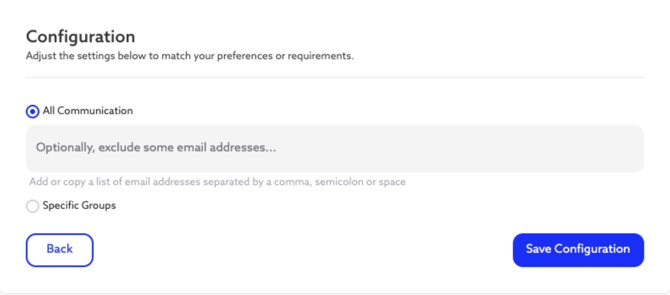
- Import All Communication The first option is the simplest but broadest, giving Knownwell access to all emails at your company. This option provides you with the most robust intelligence in the platform and is the preferred option for a number of Knownwell clients. When choosing this option, you may also elect to exclude specific email addresses from being imported.
- Only Import Specific Groups The second option allows you to utilize groups within your email provider. For example, you may have existing groups, such as “delivery team” or “client account team,” that interact with the clients you want to evaluate. You or your admin could grant access to just those specific groups, so Knownwell would only see emails from those groups.
Whether you choose all communications or selected groups, some amount of commercial intelligence is better than none at all.
Making Your Choice
These choices of ingestion level are meant to give you the right balance of control and commercial intelligence. Full ingestion delivers the most robust insights. Groups allow you to stay highly selective, and your preferences can always be updated if necessary. Whichever path you take, Knownwell ensures you get actionable intelligence without extra overhead.
Share this document with your IT lead if necessary, and choose your option today. Whichever route you choose, we have documentation that can guide you through the setup in 15 minutes or less.